/
Blog
/
The Essential Elements of an HTML Email

The Essential Elements of an HTML Email

The Essential Elements of an HTML Email
No items found.
HTML Email

Creating an HTML email that renders well across various email clients and platforms can be challenging due to the different ways they handle HTML and CSS. Here are the essential elements and best practices for creating an effective HTML email.
1. DOCTYPE Declaration

  • Purpose: To define the document type and HTML version.
  • Example: <!DOCTYPE html>

2. HTML and Body Tags

  • Purpose: To enclose the content of the email.
  • Example: <html> <body> ... </body> </html>

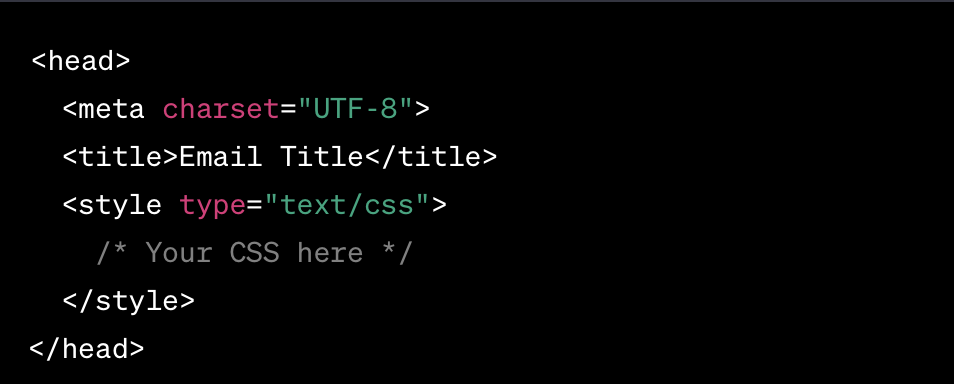
3. Head Section

  • Purpose: To include meta-tags, style tags, and other head elements.
  • Example:

4. Inline CSS

  • Purpose: To ensure styling is consistent across various email clients.
  • Example: <p style="color: #333;">Text here</p>

5. Table-Based Layout

  • Purpose: To create a layout that is compatible with most email clients.
  • Example:

6. Responsive Design

  • Purpose: To ensure emails are mobile-friendly.
  • Example: Using media queries in the <style> tag within the <head> section.

7. Images

  • Purpose: To enhance visual appeal.
  • Example:
  • Note: Always use absolute URLs for images and provide an alt attribute.

8. Text Content

  • Purpose: To convey the message.
  • Example:

9. Call to Action (CTA)

  • Purpose: To guide recipients on what to do next.
  • Example:

10. Unsubscribe Link

  • Purpose: To comply with email marketing laws.
  • Example:

11. Footer

  • Purpose: To provide additional information and links.
  • Example:

12. Testing

  • Purpose: To ensure compatibility and functionality across all email clients and platforms.
  • Tools: Use email testing tools like Litmus or Email on Acid.

Additional Tips:

  • Alt Text: Always use alt text for images to ensure that the message is conveyed even when images are not displayed.
  • Avoid JavaScript: Most email clients do not support JavaScript.
  • Limit the Use of External CSS: Inline styles are more widely supported in email clients.
  • Use Web-Safe Fonts: Such as Arial, Georgia, and Times New Roman to ensure compatibility.

Always thoroughly test your HTML email on various platforms and email clients to ensure that it renders correctly and provides a good user experience.

Elevate Your Game in Just 5 Minutes

Get the daily dose of 'Morning Metrics' that makes navigating the growth hacking landscape both rewarding and enjoyable.

Stay ahead and informed, all in the time it takes to sip your morning coffee, for free. Enter your email, Begin the Growth Journey Now.


Thank you! Your submission has been received!
Oops! Something went wrong while submitting the form.
